Open the Camera
Launch the app and grant location permissions to allow precise tracking.
The ultimate camera tool for professionals, travelers, and field workers. Automatically stamp live maps, exact coordinates, dates, and times on every picture you take.
Get it on Google Play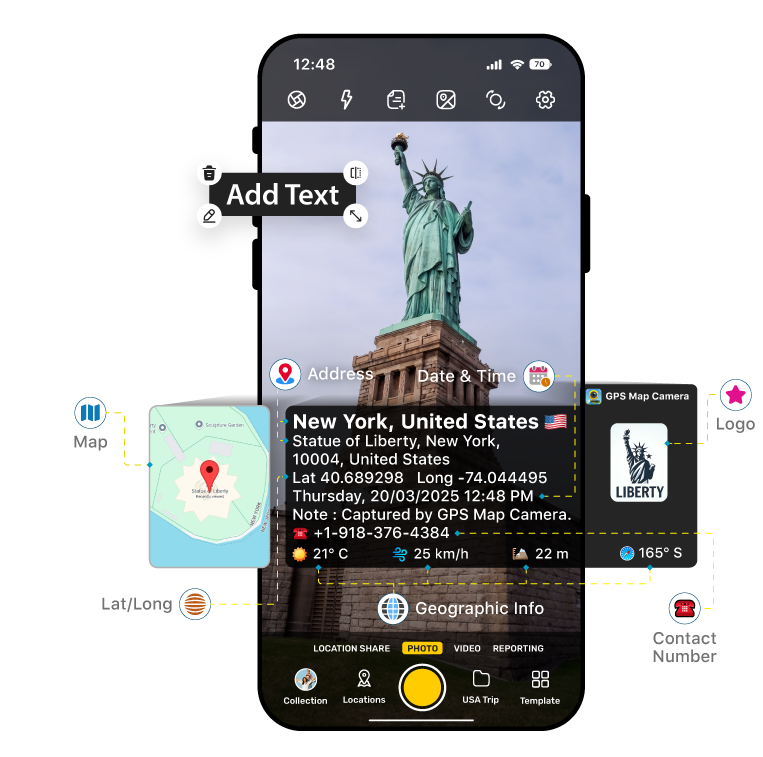
Geotagging your memories and work evidence is as easy as taking a normal photo.
Launch the app and grant location permissions to allow precise tracking.
Select which data to show: Map view, Latitude/Longitude, Address, or Date/Time.
Take the photo. The location watermark is instantly applied and saved to your gallery.
Everything you need for accurate digital documentation.
Fetch highly accurate latitude and longitude data. Supports multiple coordinate formats (Decimal, DMS).
Embed a visual map directly onto your photo. Toggle between standard, satellite, and terrain views.
Add precise time and date stamps. Adjust font styles, colors, and date formats to suit your needs.
Add personalized text, project names, or sequence numbers directly onto the image watermark.
Automatically include current temperature and weather conditions at the time the photo was taken.
Record the exact magnetic compass direction you were facing when the shutter was pressed.
Designed for anyone who needs verifiable proof of location and time.
Document property conditions, site progress, and plot locations with verifiable coordinates.
Keep a geographical diary of your adventures so you never forget where a scenic photo was captured.
Agriculture, survey, and delivery professionals can easily report visual proof of location to employers.
Find quick answers to common questions about the app.
Yes, the core features of the app are completely free to use. Premium features may be available as in-app purchases for advanced template customization.
The app can capture basic GPS coordinates (Latitude/Longitude) offline. However, resolving the physical text address and loading live map imagery requires an active internet connection.
Yes, the app provides a manual location feature allowing you to tag photos with custom coordinates if needed for specific projects.
Photos are saved directly to your device's internal storage inside a dedicated "GPS Map Cam" folder, making them easy to find in your phone's default Gallery.